








Release 7.49
- Release Notes Published:
Update Deploying: October 20, 2026
Breakdown
The following items are currently being tested by our Quality Assurance Team and will be released into Compete on Tuesday, October 20th, 2026, at 4:30 AM EST.
Note: These may not have affected your location:
Compete Updates
- Corporate agreements are now saving with correct Maximum Amount pricing
- Back Office > Configuration > e-Waivers > Browse e-Waivers: Added Online column and a filter
e-Waiver Report Updates
Enhancements and new reports added for e-waiver reporting:
- Members without e-Waivers Report
- Filtering Updates:
- By default, Inactive waivers are no longer shown. Can be enabled to show within the e-Waiver Filter.
- e-Waiver Filter now includes more controls for Online vs Template waivers
- Waiver Type Filter added (Only works if e-Waiver filter is not enabled)
- Member Report Filtering added
- Member Tagging added
- Report View (Detail or Summary) added
- Report Content:
- Lines are now split per e-Waiver, and not just per member
- Summaries now present on the last page
- Mobile Phone & Email columns added
- Added Export Details functionality
- Filtering Updates:
- e-Waivers by Resign Reminder Date Report
- Added Export Details functionality, reused from other report
- Filtering Updates:
- By default, Inactive waivers are no longer shown. Can be enabled to show within the e-Waiver Filter.
- e-Waiver filter now includes more controls for Online vs Template waivers
- Waiver Type Filter added (Only works if e-Waiver filter is not enabled)
- Member Tagging added
- Report Content:
- Summaries now present on the last page
- Mobile Phone & Email columns added
- Now orders by Member ID
- NEW REPORT ADDED: e-Waivers Signed
- Shows all signed e-Waivers, whether template or online, based on a date range
- Includes waiver and member filtering options
- Shows all signed e-Waivers, whether template or online, based on a date range
Email Configuration Updates
- Facilities can now control welcome and EME credentials emails for members and guests:
- Compete Front Desk and Back Office:
- Always prompt to send E-contract/ welcome email
- Agreement sold: EME access emails
- Add Member: EME access emails (Back Office Only)
- Add Prospect/ Guest: EME access emails (Back Office & Front Desk)
- Member Info: Change Member ID or Username (Password reset button will still send even if unchecked)
- Change Request: Change Member ID or Online Login (Password reset button will still send even if unchecked)
- Compete Front Desk and Back Office:
- Online Guest Enrollment: EME access email
- JOL:
- E- Contract/ welcome email
- EME access emails
- COG:
- Agreement sold: E-Contract/ welcome email
- Add member: EME access emails
- Add prospect: EME access emails
- Member management: EME access emails
- Facilities can now control emails triggered from ESS:
- Appointment created: member confirmation
- Appointment edited: member confirmation
- Appointment cancelled: member confirmation
- Appointment created: employee notification
- Appointment edited: employee notification
- Appointment cancelled: employee notification
Employee Self-Service (ESS) Updates
- Ability to search for members via phone number
- If an appointment does not have a cancelation fee configured, the member will no longer see a cancelation fee listed in the confirmation email
- Ability to control emails sent to members and employees (see above)
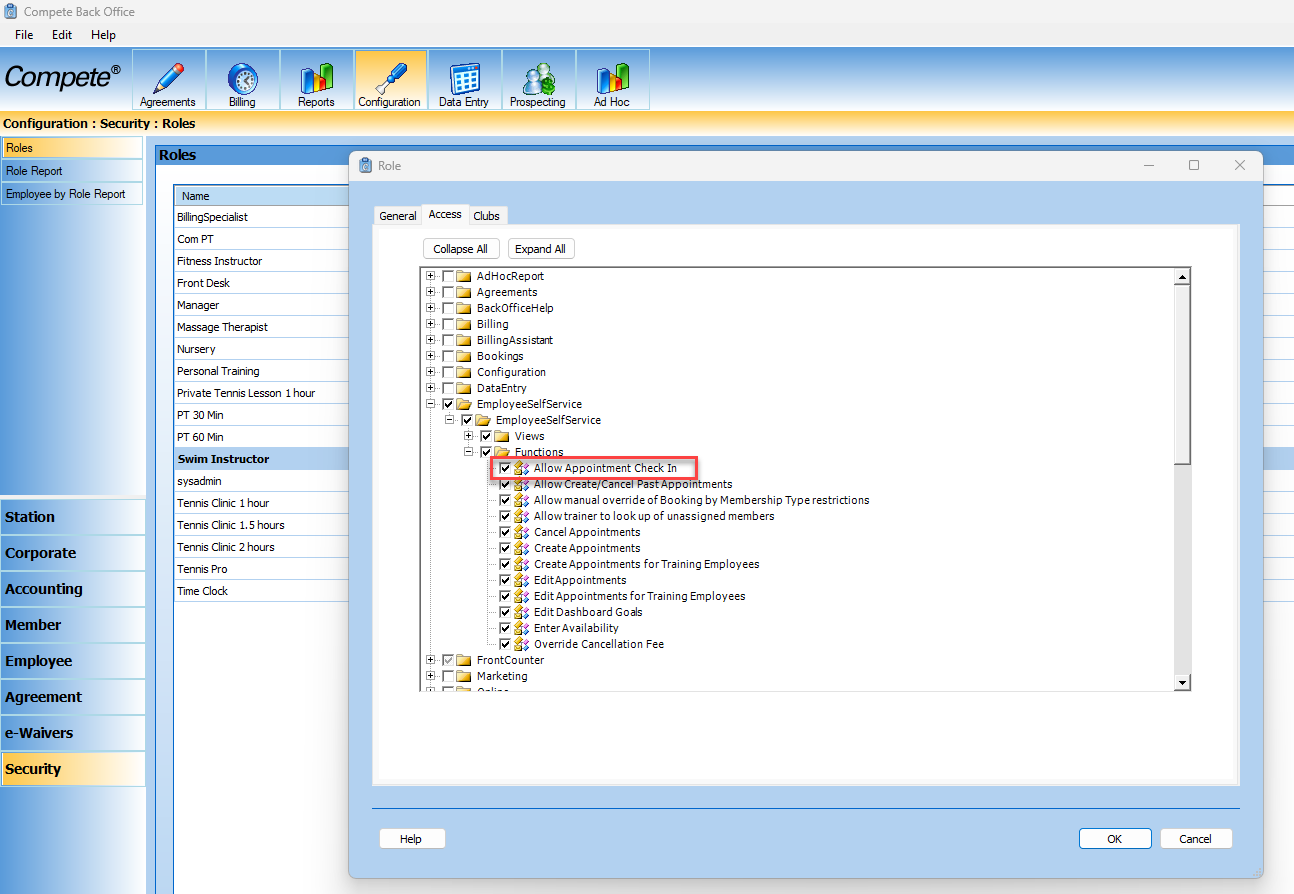
- Employees can check members with pre-paid sessions in for their appointments via ESS. To turn this on, go to Back Office > Configuration > Security > Roles > Choose appropriate role > Employee Self Service folder > Functions > Allow Appointment Check In
JoinOnline (JOL) Updates
- JOL now shows correct pricing per billing cycle for add on services
- Agreements sold in JOL no longer have formatting issues in the PDF that is sent to the member
- Ability to control emails sent to new members with EME login credentials (see above)
Empower ME (EME) Updates
- JOL now shows correct pricing per billing cycle for add on services
- Agreements sold in JOL no longer have formatting issues in the PDF that is sent to the member
- Ability to control emails sent to new members with EME login credentials (see above)
Compete Messaging Updates
- Automated Messaging for New Members can now be segregated by Membership Type
- Enhancements made to the e-Waiver builder:
- Can copy existing waivers
- Can now preview the waiver
- Terms and Conditions moved to the end of the page
API Enhancements
- New API ‘/api/v3/classcourse/unenrollmemberclasscoursevalidation’ to preview an unenrollment before it is committed. This is a read-only call that returns whether the enrollment can be unenrolled at this time, any cancellation fee that applies, what comes back to the member (RefundKind and AllowedRefundDestinations), and the NetTotal. The EnrollmentId is taken from the existing ‘GetClassesAndCoursesByMember’ call, using each instance’s Id.
- New API ‘/api/v3/classcourse/unenrollmemberclasscoursecommit’ to unenroll a member from a class or course. This call charges any cancellation fee via PaymentSelection, applies the configured refund, and reports standby promotion and email outcomes.
- New API ‘/api/v3/prospect/convertmembertoprospect’ to convert a member to a prospect, so the Integrator now has the ability to change a customer’s Member Type from Member to Prospect – the reverse of the existing ‘/api/v3/prospect/convertprospecttomember’ call.
- Update to the logic in CORE and the V3 API that determines which agreements are updated when ‘UpdateActiveAgreements=true’ is passed on ‘/api/v3/member/modifycardonfilebymember/’. The form of payment is now applied to the correct set of the member’s active agreements.
Learn about our upcoming updates
Take a peak behind the curtain and learn about some of our current items in active development, where they are in their lifecycle stage, and a sneak peak at future items to come.